Renew a Companion Card
Part of the Companion Card topic
If your Companion Card has expired and you still need support to get out and about, you can renew it.
On this page
In short
You can use this service to:
- renew a Companion Card
- renew a Companion Card on behalf of someone else.
You must complete a health professional assessment 198.9 KB) before you start. See How to renew your Companion Card for the full renewal process.
What you should know
When Companion Card holders purchase a ticket at participating venues or on public transport, they receive a second ticket for their companion at no charge at participating venues and on public transport. A companion ticket is also exempt from booking fees.
The Companion Card is issued in the name of the person who has a disability. It is valid for 5 years. To continue using the card, you will need to renew it.
A companion is any person who accompanies a cardholder and provides attendant care support. The cardholder’s chosen companion may be a paid or unpaid assistant or carer, family member, friend or partner.
Who can use this service
| You can renew a Companion Card if: |
|---|
| you already have or had a Queensland Companion Card |
| the Companion Card is expired or about to expire |
| you are a permanent resident of Queensland |
| you have a permanent disability |
| you need a high level of support from a companion to help you participate in most community events and activities |
| your need for this support is likely to be lifelong |
| aids and other technologies don’t enable you to get around independently |
| you are applying for a child, and their support needs are significantly above age-appropriate levels. |
| Don’t use this service if: |
|---|
|
you are applying for a card for the first time Instead, get a Companion Card. |
|
you live outside of Queensland Instead, apply in that state, territory or country. If your card has expired and you no longer live in Queensland, you can transfer your card interstate. |
|
you are under 18 Instead, get your parent or guardian to complete the form for you. |
How to renew your Companion Card
Choose how to renew your card and follow the steps.
Step 1: Check you can renew online
To renew online you must be:
- able to log in with a digital ID using your email address
- the cardholder or a parent, legal guardian, spouse, family member or friend of the person with a disability, if you are applying on behalf of someone else.
Professional support workers, paid carers or other representatives applying on behalf of the person with a disability, should apply by post, email or in person to ensure the application is not linked to their personal account.
Step 2: Get a portrait photo of the cardholder
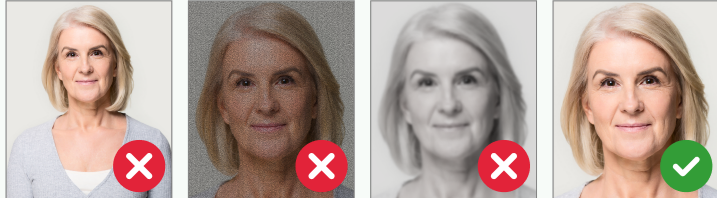
We’ll need a portrait style photo of the cardholder to include on the card. This is the person with the disability.
You can take this photo yourself, ask someone to take it for you or you can have it taken professionally.
Make sure the photo:
- is portrait
- shows your face
- shows your face and shoulders taking up most of the frame
- is in colour, clear and in focus
- is taken in front of a plain light background in a well-lit space.
Step 3: Engage your health professional
Verify your photo
The photo you provide must be verified by a health professional. It can be a digital version or a printed copy of the photo.
Renewal assessment
Before you start the online form, your health professional must fill out the renewal assessment. They will need to verify your permanent disability and confirm your likely lifelong need for significant attendant care support.
You will need to upload a copy of the completed assessment during the application.
You can download the assessment form and send it to your health professional by email, or you can print it out for them to fill out a paper copy.
Download the renewal health professional assessment 198.9 KB)
Download the renewal health professional assessment 54.8 KB)
Health professionals who can complete the assessment:
- registered medical practitioner
- registered physiotherapist
- registered psychologist
- registered occupational therapist
- registered nurse
- certified practising speech pathologist
- qualified social worker.
Step 4: Start your online application
Complete the online form and upload your renewal assessment and verified photo.
Your documents should be either doc, docx, pdf, png, jpg or jpeg file types.
Step 5: Receive confirmation
We will confirm via email or SMS that we have received your application.
Step 6: Receive your Companion Card
Your application will be reviewed and if it is approved, your Companion Card will be sent to you by post.
Step 1: Download the form
Download and complete the renewal form.
Download the Companion Card renewal form 455.1 KB)
Download the Companion Card renewal form 66 KB)
Step 2: Get a portrait photo of the cardholder
We’ll need a portrait style photo of the cardholder to include on the card. This is the person with the disability.
You can take this photo yourself, ask someone to take it for you or you can have it taken professionally.
Make sure the photo:
- is portrait
- shows your face
- shows your face and shoulders taking up most of the frame
- is in colour, clear and in focus
- is taken in front of a plain light background in a well-lit space.
Step 3: Engage your health professional
Verify your photo
The photo you provide must be verified by a health professional. It can be a digital version or a printed copy of the photo.
Renewal assessment
You will need to get your health professional to fill out the Part 2 – Renewal assessment in the form. They will need to verify your permanent disability and confirm your likely lifelong need for significant attendant care.
Health professionals who can complete the assessment:
- registered medical practitioner
- registered physiotherapist
- registered psychologist
- registered occupational therapist
- registered nurse
- certified practising speech pathologist
- qualified social worker.
Step 4: Submit your application
Post your application and photo to:
Companion Card
Smart Services Queensland
Reply Paid 89109
BRISBANE CITY QLD 4000
Step 5: Receive confirmation of your application
We will confirm via SMS that we have received your application.
Step 6: Receive your Companion Card
Your renewal form will be reviewed and if it is approved, your Companion Card will be sent to you by post.
Step 1: Download the form
Download and complete the renewal form.
Download the Companion Card renewal form 455.1 KB)
Download the Companion Card renewal form 66 KB)
Step 2: Get a portrait photo of the cardholder
We’ll need a portrait style photo of the cardholder to include on the card. This is the person with the disability.
You can take this photo yourself, ask someone to take it for you or you can have it taken professionally.
Make sure the photo:
- is portrait
- shows your face
- shows your face and shoulders taking up most of the frame
- is in colour, clear and in focus
- is taken in front of a plain light background in a well-lit space.
Step 3: Engage your health professional
Verify your photo
The photo you provide must be verified by a health professional. It can be a digital version or a printed copy of the photo.
Renewal assessment
You will need to get your health professional to fill out the Part 2 – Renewal assessment in the form. They will need to verify your permanent disability and confirm your likely lifelong need for significant attendant care.
Health professionals who can complete the assessment:
- registered medical practitioner
- registered physiotherapist
- registered psychologist
- registered occupational therapist
- registered nurse
- certified practising speech pathologist
- qualified social worker.
Step 4: Submit your application
Email your application and photo to companioncard@smartservice.qld.gov.au.
Step 5: Receive confirmation
We will confirm via email that we have received your application.
Step 6: Receive your Companion Card
Your application will be reviewed and if it is approved, your Companion Card will be sent to you by post.
Step 1: Download the form
Download and complete the renewal form.
Download the Companion Card renewal form 455.1 KB)
Download the Companion Card renewal form 66 KB)
Step 2: Get a portrait photo of the cardholder
We’ll need a portrait style photo of the cardholder to include on the card. This is the person with the disability.
You can take this photo yourself, ask someone to take it for you or you can have it taken professionally.
Make sure the photo:
- is portrait
- shows your face
- shows your face and shoulders taking up most of the frame
- is in colour, clear and in focus
- is taken in front of a plain light background in a well-lit space.
Step 3: Engage your health professional
Verify your photo
The photo you provide must be verified by a health professional. It can be a digital version or a printed copy of the photo.
Renewal assessment
You will need to get your health professional to fill out the Part 2 – Renewal assessment in the form. They will need to verify your permanent disability and confirm your likely lifelong need for significant attendant care.
Health professionals who can complete the assessment:
- registered medical practitioner
- registered physiotherapist
- registered psychologist
- registered occupational therapist
- registered nurse
- certified practising speech pathologist
- qualified social worker.
Step 4: Submit your application
Submit your application and photo in person at a Queensland Government Service Centre
Brisbane
- Upper Plaza (access via the corner of George and Charlotte Streets)
33 Charlotte Street
BRISBANE QLD 4000
Cairns
- William McCormack Place ground floor
5B Sheridan Street
CAIRNS QLD 4870
Maroochydore
- Mike Ahern ground floor
12 First Avenue
MAROOCHYDORE QLD 4558
Step 5: Receive confirmation of your application
We will give you a receipt when you submit your application in person.
Step 6: Receive your Companion Card
Your application will be reviewed and, if it is approved, your Companion Card will be sent to you by post.
How long it takes
- Allow 20 business days for us to process your application once we’ve received it.
- Once the application is approved, you’ll receive an SMS or email.
- Allow another 3 weeks for the card to arrive in the mail.
- Applications missing information or documents take longer to process.
- Allow extra time for public holidays.
How much it costs
Free
Managed by: Families, Seniors, Disability Services and Child Safety